
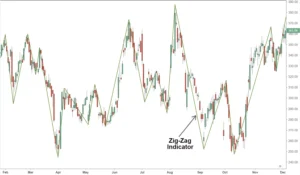

ZigZag Stochastic Indicator
Introducing the ZigZag Stochastic Indicator, a powerful tool for MetaTrader 5 that can take your trading to the next level. This indicator combines the popular ZigZag pattern with the Stochastic oscillator, providing valuable insights into market trends and potential reversals. By identifying key support and resistance levels, it helps traders make informed decisions and maximize profits. With its user-friendly interface and customizable settings, the ZigZag Stochastic Indicator is suitable for both novice and experienced traders. However, like any tool, it has its pros and cons. While it can generate accurate signals, it may also produce false positives in volatile markets. Overall, this indicator is a valuable addition to any trader’s toolbox.
- Description
- Additional information
Description
Points are shown on a chart by the Zig Zag indicator if a percentage change in prices exceeds a predetermined variable. The indicator’s percentage level can be adjusted by an analyst. After then, straight lines are formed to join these spots.
The indicator aids in the identification of price patterns. It tries to display changes in trends and removes random price variations. Only when there is a price fluctuation of more than a predetermined percentage, usually 5%, between a swing high and low do zigzag lines emerge. The indicator facilitates the identification of trends across all time periods by filtering out small price swings.
Elliot Wave Theory is sometimes used in conjunction with the Zig Zag indicator to ascertain where each wave falls within the overall cycle. Traders can test out various percentage values to see which produces the greatest outcomes. A 4% setting, for instance, may characterize waves more precisely than a 5% setting. Because stocks exhibit unique patterns, traders should probably adjust the Zig Zag indicator’s percentage setting to fit that particular stocks.
The Zig Zag indicator is useful for identifying possible support and resistance zones between plotted swing highs and swing lows, but it is not a reliable way to forecast future trends. Reversal motifs, such as double bottoms and head and shoulders tops, can also be seen in zigzag lines. When the direction of the Zig Zag line changes, traders may utilize well-known technical indicators like the stochastics oscillator and the relative strength index (RSI) to determine if the price of a security is overbought or oversold.
ZigZag(HL,%change=X,retrace=FALSE,LastExtreme=TRUE)If %change>=X,plot ZigZagwhere:HL=High-Low price series or Closing price series%change=Minimum price movement, in percentageRetrace=Is change a retracement of the previous move or an absolute change from peak to trough?LastExtreme=If the extreme price is the same over multiple periods, is the extreme price the first or last observation?
How the Zig Zag Indicator Is Calculated
- Select a starting position (high or low swing).
- Select the percentage change in pricing.
- Determine the subsequent swing high or low that deviates from the initial point = >% of price movement.
- From the beginning point to the new point, draw a trendline.
- Determine whether swing high or low, with relation to the new point = > % price change, comes next.
- Make a trendline.
- Continue to the most recent swing low or high.
FAQ
- Can I download this indicator ‘ZigZag Stochastic Indicator’ for free?
- Yes, this indicator – ZigZag Stochastic Indicator, like other indicators presented on the site, is free, with the exception of those where there is a fee, they are available only on the official website of the developer
- Where does this Indicator come from?
- The Indicator, like others, is collected from the official website of trading platform MetaTrader 5 and developers
- Can I use ZigZag Stochastic Indicator on the mobile version of the trading platform MetaTrader 5?
- No, indicators can only be used on the web version of the trading platform MetaTrader 5.
Additional information
| Platform | MetaTrader 5 |
|---|---|
| Format | ZIP |
| Price | Free |
| Safety | Safe |
| Type file | Indicator |
| Size | 268kB |